O HATEOAS, é uma das principais constraints arquiteturais do REST e possibilita a navegação entre recursos, que são representações dos modelos de negócio da aplicação. Esse post é bem mão na massa e se quiser aprofundar um pouco mais em conceitos teóricos de HATEOAS confira o nosso post Entendendo HATEOAS. Vamos tomar como base a aplicação desenvolvida no nosso outro post Documentando aplicações REST com SpringBoot e Swagger. Para começar você pode baixar o código deste post aqui e descompactar o arquivo zip e importar na sua IDE preferida ou clonar usando Git:
git clone https://github.com/leandrocgsi/simple-rest-example-swagger.git
Primeiro altere o pom.xml adicionando os trechos destacados por comentários abaixo.
<project xmlns="http://maven.apache.org/POM/4.0.0" xmlns:xsi="http://www.w3.org/2001/XMLSchema-instance" xsi:schemalocation="http://maven.apache.org/POM/4.0.0 http://maven.apache.org/xsd/maven-4.0.0.xsd">
    <modelversion>4.0.0</modelversion>

    <groupid>br.com.erudio</groupid>
    <artifactid>simple-rest-example-hateoas</artifactid>
    <version>0.0.1-SNAPSHOT</version>

    <parent>
        <groupid>org.springframework.boot</groupid>
        <artifactid>spring-boot-starter-parent</artifactid>
        <version>1.3.3.RELEASE</version>
    </parent>

    <dependencies>

        <dependency>
            <groupid>org.springframework.boot</groupid>
            <artifactid>spring-boot-starter-web</artifactid>
        </dependency>
        <dependency>
            <groupid>org.springframework.boot</groupid>
            <artifactid>spring-boot-starter-actuator</artifactid>
        </dependency>

        <!-- Adicione a dependencia de HATEOAS-->
        <dependency>
            <groupid>org.springframework.boot</groupid>
            <artifactid>spring-boot-starter-hateoas</artifactid>
        </dependency>

        <dependency>
            <groupid>com.mangofactory</groupid>
            <artifactid>swagger-springmvc</artifactid>
            <version>1.0.0</version>
        </dependency>
        <dependency>
            <groupid>org.ajar</groupid>
            <artifactid>swagger-spring-mvc-ui</artifactid>
            <version>0.4</version>
        </dependency>
        <dependency>
            <groupid>org.apache.tomcat.embed</groupid>
            <artifactid>tomcat-embed-jasper</artifactid>
            <scope>provided</scope>
        </dependency>

        <!-- Adicione as dependencias de teste -->
        <dependency>
            <groupid>org.springframework.boot</groupid>
            <artifactid>spring-boot-starter-test</artifactid>
            <scope>test</scope>
        </dependency>
        <dependency>
            <groupid>com.jayway.jsonpath</groupid>
            <artifactid>json-path</artifactid>
            <scope>test</scope>
        </dependency>

    </dependencies>

    <properties>
        <java.version>1.8</java.version>
    </properties>

    <build>
        <plugins>
            <plugin>
                <groupid>org.springframework.boot</groupid>
                <artifactid>spring-boot-maven-plugin</artifactid>
            </plugin>
        </plugins>
    </build>

    <repositories>
        <repository>
            <id>spring-releases</id>
            <url>https://repo.spring.io/libs-release</url>
        </repository>
        <repository>
            <id>jcenter-release</id>
            <name>jcenter</name>
            <url>http://oss.jfrog.org/artifactory/oss-release-local/</url>
        </repository>
    </repositories>

    <pluginrepositories>
        <pluginrepository>
            <id>spring-releases</id>
            <url>https://repo.spring.io/libs-release</url>
        </pluginrepository>
    </pluginrepositories>

</project>
Primeiro vamos alterar a classe Greeting que agora ira extender ResourceSupport.
package br.com.erudio.models;

import org.springframework.hateoas.ResourceSupport;

import com.fasterxml.jackson.annotation.JsonCreator;
import com.fasterxml.jackson.annotation.JsonProperty;

public class Greeting extends ResourceSupport {

    private final long idGreeting;
    private final String content;

    @JsonCreator
    public Greeting(@JsonProperty("id") long id, @JsonProperty("content") String content) {
        this.idGreeting = id;
        this.content = content;
    }

    public long getIdGreeting() {
        return idGreeting;
    }

    public String getContent() {
        return content;
    }
}
Agora adicione os trechos comentados a classe GreetingController.
package br.com.erudio.web.controllers;

import static org.springframework.hateoas.mvc.ControllerLinkBuilder.linkTo;
import static org.springframework.hateoas.mvc.ControllerLinkBuilder.methodOn;

import java.util.concurrent.atomic.AtomicLong;

import org.springframework.http.HttpEntity;
import org.springframework.http.HttpStatus;
import org.springframework.http.MediaType;
import org.springframework.http.ResponseEntity;
import org.springframework.web.bind.annotation.RequestMapping;
import org.springframework.web.bind.annotation.RequestMethod;
import org.springframework.web.bind.annotation.RequestParam;
import org.springframework.web.bind.annotation.ResponseStatus;
import org.springframework.web.bind.annotation.RestController;

import com.wordnik.swagger.annotations.Api;
import com.wordnik.swagger.annotations.ApiOperation;

import br.com.erudio.models.Greeting;

@Api(value = "greeting")
@RestController
@RequestMapping("/greeting")
public class GreetingController {

    private static final String template = "Hello, %s!";
    private final AtomicLong counter = new AtomicLong();

	@ApiOperation(value = "Show Greeting Message" )
	@ResponseStatus(HttpStatus.OK)
    @RequestMapping(method = RequestMethod.GET, produces = MediaType.APPLICATION_JSON_VALUE)
    public HttpEntity<greeting> greeting(@RequestParam(value="name", defaultValue="World") String name) {
		Greeting greeting = new Greeting(counter.incrementAndGet(), String.format(template, name));

		// Na prática essa linha adiciona uma auto referência ao próprio endpoint
		// e apenas esse pequeno trecho de código já é o suficiente para que o endpoint
		// greeting seja HATEOAS
		greeting.add(linkTo(methodOn(GreetingController.class).greeting(name)).withSelfRel());

		return new ResponseEntity<greeting>(greeting, HttpStatus.OK);
    }
}
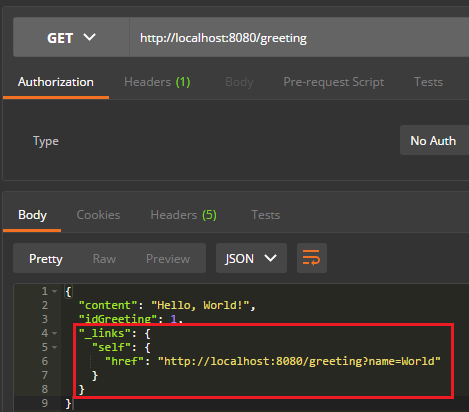
Se você iniciar a aplicação e acessar o endereço localhost:8080/greeting verá algo similar a imagem abaixo.
package br.com.erudio.models;

import java.io.Serializable;

import org.springframework.hateoas.ResourceSupport;

import com.fasterxml.jackson.annotation.JsonIgnoreProperties;

// Adicione a anotação @JsonIgnoreProperties
@JsonIgnoreProperties(ignoreUnknown = true)

//Extenda ResourceSupport
public class Person extends ResourceSupport implements Serializable{

    private static final long serialVersionUID = 1L;

	// Por padrão implementação HATEOAS do Spring tem um atributo id
	// como default por isso o ID de nossa entidade deve ser alterado
    private Long idPerson;
    private String firstName;
    private String lastName;
    private String address;

    public Person() {}

	public Long getIdPerson() {
        return idPerson;
    }

    public void setIdPerson(Long id) {
        this.idPerson = id;
    }

    public String getFirstName() {
        return firstName;
    }

    public void setFirstName(String firstName) {
        this.firstName = firstName;
    }

    public String getLastName() {
        return lastName;
    }

    public void setLastName(String lastName) {
        this.lastName = lastName;
    }

    public String getAddress() {
        return address;
    }

    public void setAddress(String address) {
        this.address = address;
    }
}
Agora vamos alterar a classe PersonController:
package br.com.erudio.web.controllers;

import static org.springframework.hateoas.mvc.ControllerLinkBuilder.linkTo;
import static org.springframework.hateoas.mvc.ControllerLinkBuilder.methodOn;

import java.util.ArrayList;
import java.util.List;

import org.springframework.beans.factory.annotation.Autowired;
import org.springframework.http.HttpStatus;
import org.springframework.http.MediaType;
import org.springframework.web.bind.annotation.PathVariable;
import org.springframework.web.bind.annotation.RequestBody;
import org.springframework.web.bind.annotation.RequestMapping;
import org.springframework.web.bind.annotation.RequestMethod;
import org.springframework.web.bind.annotation.ResponseStatus;
import org.springframework.web.bind.annotation.RestController;

import com.wordnik.swagger.annotations.Api;
import com.wordnik.swagger.annotations.ApiOperation;

import br.com.erudio.models.Person;
import br.com.erudio.services.PersonService;

@Api(value = "person")
@RestController
@RequestMapping("/person/")
public class PersonController {

    @Autowired
    private PersonService personService;
	@ApiOperation(value = "Find person by ID" )
    @ResponseStatus(HttpStatus.OK)
    @RequestMapping(value = "/{personId}", method = RequestMethod.GET, produces = MediaType.APPLICATION_JSON_VALUE)
    public Person get(@PathVariable(value = "personId") String personId){
        Person person = personService.findById(personId);

		//Adicione uma auto referencia ao método get do controller passando o ID como parâmetro
        person.add(linkTo(methodOn(PersonController.class).get(personId)).withSelfRel());
		return person;
    }

    .
    .
    .

}
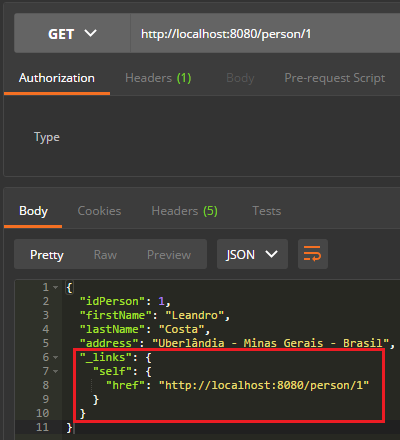
Note que ao acessar esse recurso com uma ferramenta como o POSTman teremos uma resultado similar a imagem abaixo.
Agora vamos alterar o findAll:
package br.com.erudio.web.controllers;

import static org.springframework.hateoas.mvc.ControllerLinkBuilder.linkTo;
import static org.springframework.hateoas.mvc.ControllerLinkBuilder.methodOn;

import java.util.ArrayList;
import java.util.List;

import org.springframework.beans.factory.annotation.Autowired;
import org.springframework.http.HttpStatus;
import org.springframework.http.MediaType;
import org.springframework.web.bind.annotation.PathVariable;
import org.springframework.web.bind.annotation.RequestBody;
import org.springframework.web.bind.annotation.RequestMapping;
import org.springframework.web.bind.annotation.RequestMethod;
import org.springframework.web.bind.annotation.ResponseStatus;
import org.springframework.web.bind.annotation.RestController;

import com.wordnik.swagger.annotations.Api;
import com.wordnik.swagger.annotations.ApiOperation;

import br.com.erudio.models.Person;
import br.com.erudio.services.PersonService;

@Api(value = "person")
@RestController
@RequestMapping("/person/")
public class PersonController {

	@Autowired
	private PersonService personService;

	.
	.
	.

	@ApiOperation(value = "Find all persons" )
	@ResponseStatus(HttpStatus.OK)
	@RequestMapping(value = "/findAll", method = RequestMethod.GET, produces = MediaType.APPLICATION_JSON_VALUE)
	public List<person> findAll(){
		List<person> persons = personService.findAll();
		ArrayList<person> personsReturn = new ArrayList<person>();
		for (Person person : persons) {
			String idPerson = person.getIdPerson().toString();

			// Adicione uma referencia ao método get do controller passando o ID como parâmetro
			// isso é feito para todos os elementos da lista
			person.add(linkTo(methodOn(PersonController.class).get(idPerson)).withSelfRel());
			personsReturn.add(person);
		}
		return personsReturn;
	}

	.
	.
	.

}
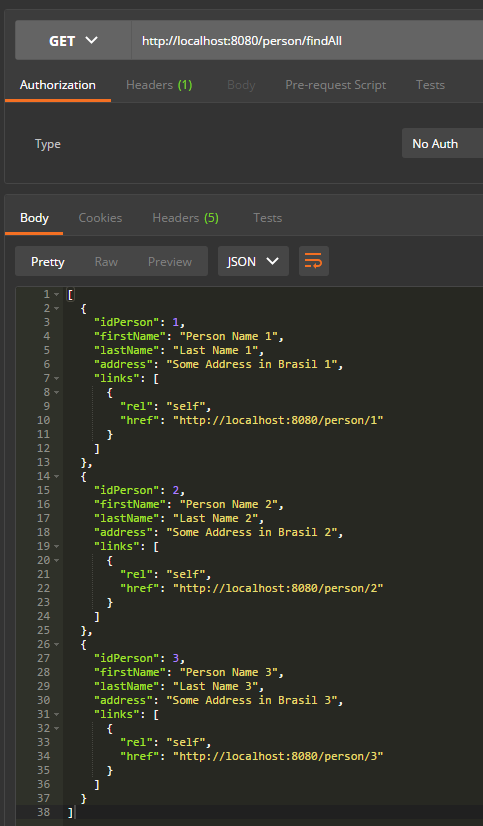
A imagem abaixo nos mostra o resultado dessa mudança. A nossa lista nos tras referencias únicas para cada um dos recursos.
Agora vamos adicionar o suporte a HATEOAS ao verbo POST da nossa aplicação.
package br.com.erudio.web.controllers;

import static org.springframework.hateoas.mvc.ControllerLinkBuilder.linkTo;
import static org.springframework.hateoas.mvc.ControllerLinkBuilder.methodOn;

import java.util.ArrayList;
import java.util.List;

import org.springframework.beans.factory.annotation.Autowired;
import org.springframework.http.HttpStatus;
import org.springframework.http.MediaType;
import org.springframework.web.bind.annotation.PathVariable;
import org.springframework.web.bind.annotation.RequestBody;
import org.springframework.web.bind.annotation.RequestMapping;
import org.springframework.web.bind.annotation.RequestMethod;
import org.springframework.web.bind.annotation.ResponseStatus;
import org.springframework.web.bind.annotation.RestController;

import com.wordnik.swagger.annotations.Api;
import com.wordnik.swagger.annotations.ApiOperation;

import br.com.erudio.models.Person;
import br.com.erudio.services.PersonService;

@Api(value = "person")
@RestController
@RequestMapping("/person/")
public class PersonController {

	@Autowired
	private PersonService personService;

	.
	.
	.

	@ApiOperation(value = "Create a new person" )
	@ResponseStatus(HttpStatus.OK)
	@RequestMapping(method = RequestMethod.POST, consumes = MediaType.APPLICATION_JSON_VALUE, produces = MediaType.APPLICATION_JSON_VALUE)
	public Person create(@RequestBody Person person){
		Person createdPerson = personService.create(person);
		String idPerson = createdPerson.getIdPerson().toString();

		// Após criarmos um novo recurso do tipo Person nós recuperamos seu ID e adicionamos
		// uma referencia ao método get do controller passando o ID como parâmetro
		createdPerson.add(linkTo(methodOn(PersonController.class).get(idPerson)).withSelfRel());
		return createdPerson;
	}

	.
	.
	.

}
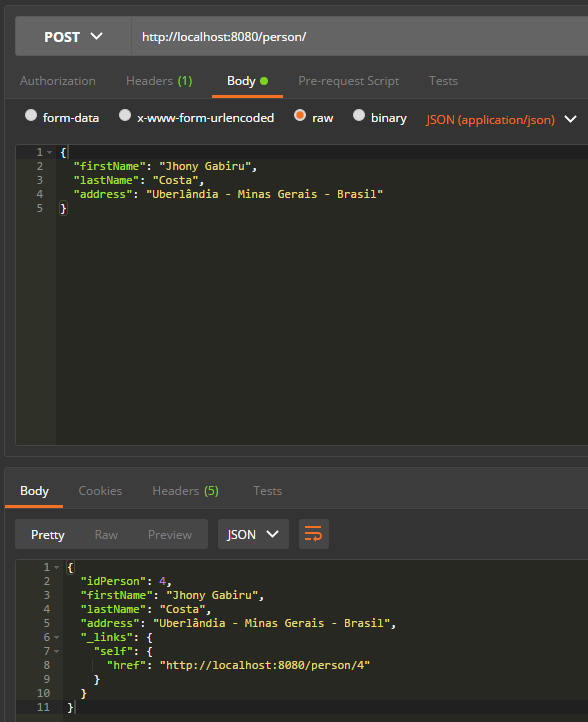
Como se pode ver na imagem após salvar uma nova pessoa a aplicação retorna um link para que as informações da mesma possam ser acessadas.
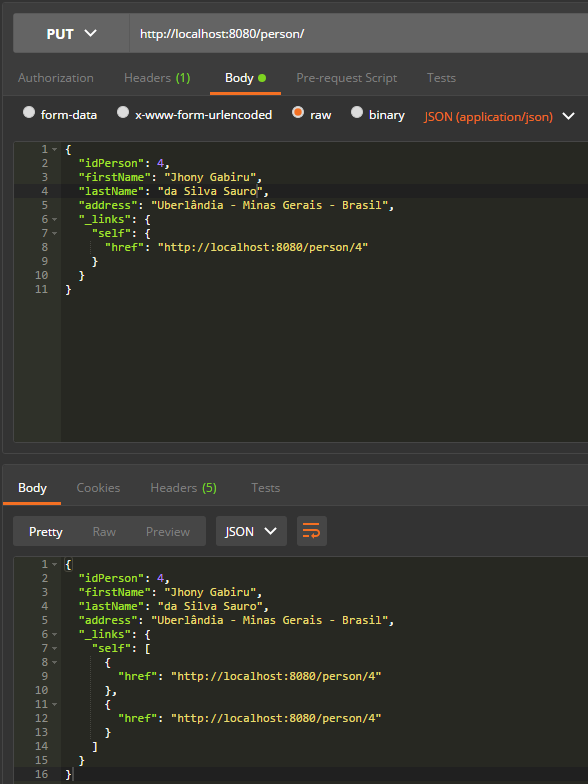
Agora vamos modificar o verbo PUT.
package br.com.erudio.web.controllers;

import static org.springframework.hateoas.mvc.ControllerLinkBuilder.linkTo;
import static org.springframework.hateoas.mvc.ControllerLinkBuilder.methodOn;

import java.util.ArrayList;
import java.util.List;

import org.springframework.beans.factory.annotation.Autowired;
import org.springframework.http.HttpStatus;
import org.springframework.http.MediaType;
import org.springframework.web.bind.annotation.PathVariable;
import org.springframework.web.bind.annotation.RequestBody;
import org.springframework.web.bind.annotation.RequestMapping;
import org.springframework.web.bind.annotation.RequestMethod;
import org.springframework.web.bind.annotation.ResponseStatus;
import org.springframework.web.bind.annotation.RestController;

import com.wordnik.swagger.annotations.Api;
import com.wordnik.swagger.annotations.ApiOperation;

import br.com.erudio.models.Person;
import br.com.erudio.services.PersonService;

@Api(value = "person")
@RestController
@RequestMapping("/person/")
public class PersonController {

	@Autowired
	private PersonService personService;

	.
	.
	.

	@ApiOperation(value = "Update an existing person")
	@ResponseStatus(HttpStatus.OK)
	@RequestMapping(method = RequestMethod.PUT,consumes = MediaType.APPLICATION_JSON_VALUE)
	public Person update(@RequestBody Person person){
		Person updatedPerson = personService.update(person);
		String idPerson = updatedPerson.getIdPerson().toString();

		// Após atualizarmos um recurso nós recuperamos seu ID e adicionamos
		// uma referencia ao método get do controller passando o ID como parâmetro
		updatedPerson.add(linkTo(methodOn(PersonController.class).get(idPerson)).withSelfRel());
		return updatedPerson;
	}

	.
	.
	.

}
Da mesma forma que com o verbo POST após atualizar uma pessoa a aplicação retorna um link para que as informações da mesma possam ser acessadas.
Como o verbo DELETE exclui um recurso não há necessidade de adicionar suporte a HATEOAS nele. Sendo assim fechamos a nossa implementação e podemos dizer que a nossa API é finalmente RESTful. Assim como nos posts anteriores você pode baixar o código deste post aqui e descompactar o arquivo zip e importar na sua IDE preferida ou clonar usando Git:
git clone https://github.com/leandrocgsi/simple-rest-example-hateoas.git
É isso aí bons estudos e continuem ligados no blog para mais novidades 😉
Treinamentos relacionados com este post










Excelente! Gostando muito dos artigos sobre HATEOAS.